
*Please disconnect your negative lead on your battery before attempting installing the radio.
Please follow this video to remove your factory stereo:
https://www.youtube.com/watch?v=aXedC88h1dI&t=95s
You do not need to keep the CD player or screen in the dash. Please unplug and remove both of them.
Connect three grey matching plugs to the vehicle.
Connect radio antenna adapter to the vehicle. Metal round end goes to the radio.
Connect brown plug for USB and black plug for backup camera to the back of the radio. You can route the USB to come out from glove compartment or side of center console to get access to it. On the black plug, the female yellow RCA with tag "Camera" is the input for backup camera. Brown wire with tag "back" is the trigger for reverse. Connect the wire to backup lamp power then the screen will automatically switch to reverse screen.
If the unit is not turning on, please locate this 16 pin plug:
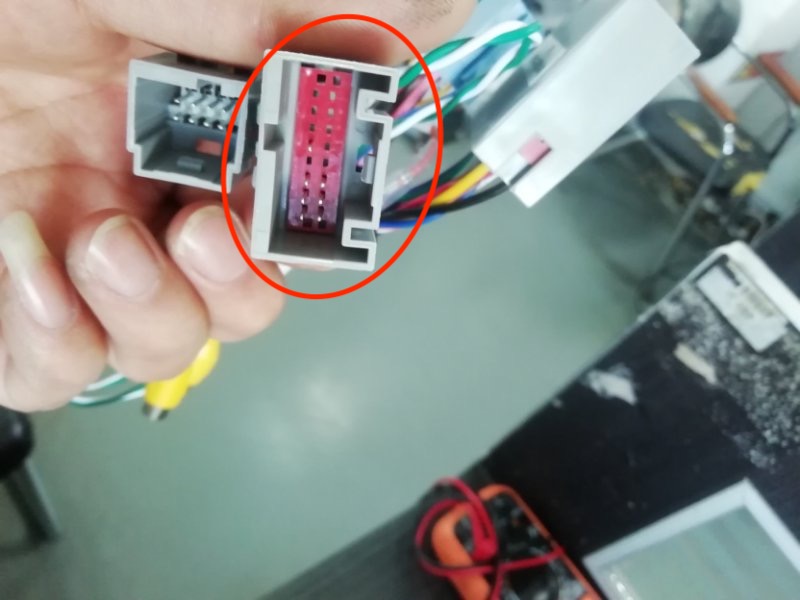
There is a red ACC wire on this plug that might be shorted to cause the unit not turning on. Cut that wire then it should fix the problem.
Climate Control and Heated Seat Settings:
After installing and the unit turns on, please check for AC functions. If your AC or your heated seat is not functioning properly, please go to setting -> Install set / Advanced -> 8861 -> Car Type -> Please choose Yema Old Hi 09-13 if you have auto AC with heated seat OR choose Yema Old Lo 09-13 if you have manual AC. -> Make sure the protocol is on Haoshouyin -> press "ok" at the bottom -> on pink page, press back arrow at bottom left - press save and reboot so the settings can take effect.
If you purchased the wrong AC type, it will cause your AC not functioning. To change from Auto AC to manual AC or the other way around, please follow this guide here: https://rrcs.zendesk.com/hc/en-us/articles/360041842352--10-12-Mustang-Auto-AC-to-Manual-AC-Switch
Comments
0 comments
Please sign in to leave a comment.