
*Malibu with factory noise cancellation will have no sound to the speakers.
Please follow the video below to remove your factory radio:
https://www.youtube.com/watch?v=1T2G3q5jAbo&t=8s
Locate a dark yellow and a grey connector from factory. Connect them to matching harness on the radio.
There is also a black connector from the factory, connect that to radio antenna connector.
After that, connect GPS antenna to the back of the radio.
Connect USB white connector and yellow video input connector.
Locate a CCD yellow female RCA port behind the radio, connect male RCA from the main harness to CCD yelloe female RCA.
Reverse the steps to install the radio back.
No sound.
If you have active noise cancellation, please follow the instruction below:
Please locate a grey connector on factory side: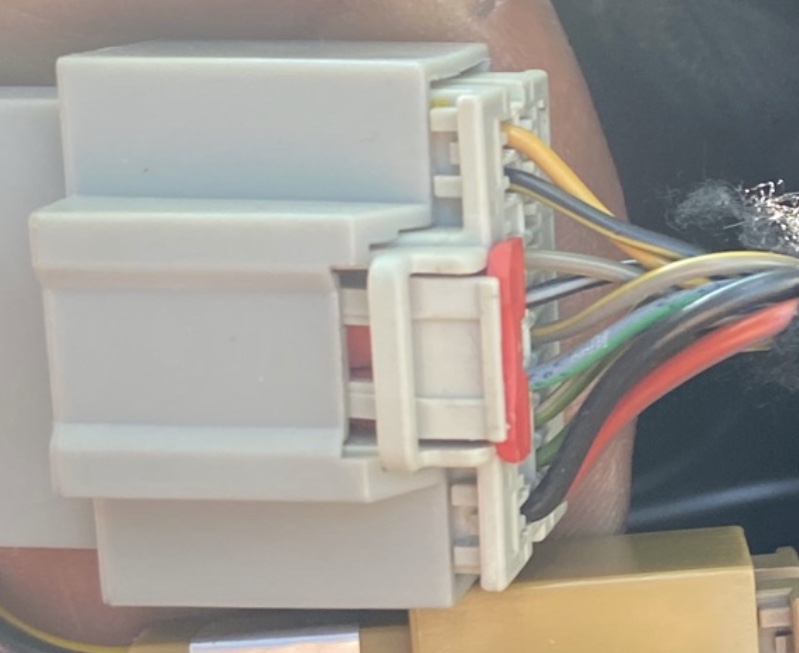
On the bottom of the image, there is a red wire. RIGHT NEXT to the red wire, you have got a green with yellow strip wire. The green/yellow wire is your active noise cancellation amp turn on wire.
Locate a blue loose wire on the main harness. Test the blue wire against and make sure it has 12V, connect blue wire to green/yellow wire to get sound.
*Note: it is not the green with white strip two position away from red wire.
Comments
0 comments
Please sign in to leave a comment.